

Performance
A form's element count grows faster than its schema suggests — a Repeater with twelve fields and fifty rows is already six hundred elements, and a Matrix multiplies rows by columns. At that scale Vueform's cost model stays predictable. Mount cost grows linearly with the element count, while typing into a field costs the same in a 100-element form as in a 1,000-element one — a keystroke only wakes the element it changes.
Benchmarks
Everything below comes from Vueform's benchmark suite. It measures production builds of the packed packages — what npm publish would ship — in headless Chromium driven by Playwright, mounting forms with a growing number of elements N. Every repetition runs in a fresh browser context and page, heap deltas are taken with forced garbage collection, and mount cases time the full path from schema to painted DOM.
Each case runs in both of Vue's rendering modes — the classic virtual DOM and vapor mode, Vue 3.6's compilation strategy that turns templates into direct DOM operations with no virtual DOM to create or diff. Vueform ships a separate vapor build of the same components, selected by the vapor export condition — see Vapor for how to opt in.
The environment behind the numbers:
- CPU:
Apple M5 - RAM:
16 GB - OS:
macOS 26.6.2 - Browser:
Chromium 153.0.8010.12(headless) - Vue:
3.6.0-rc.5 - Vueform:
2.0.0-0.7 - Last run:
2026-10-23
Rendering
The baseline case (render-text) mounts a flat form of N text elements and measures the time from schema to painted DOM:
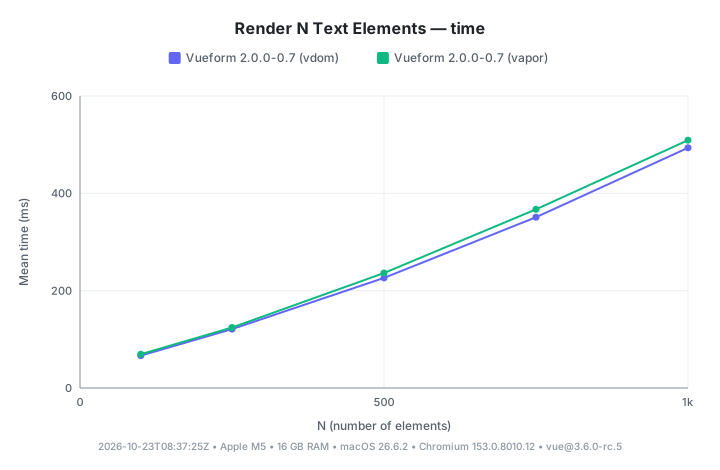
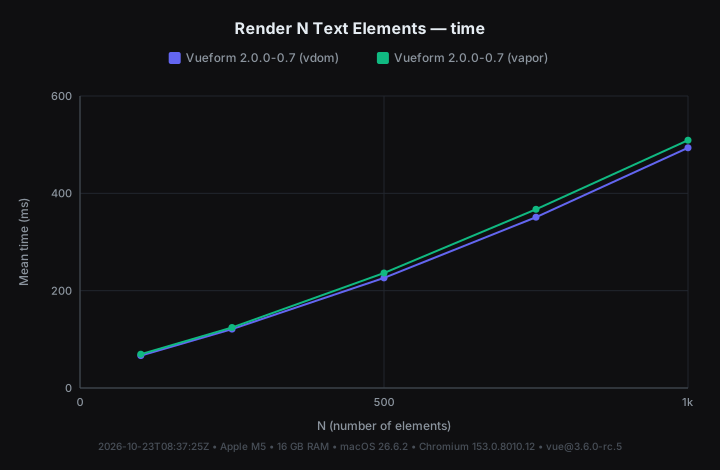
Mount time of a form with N text elements
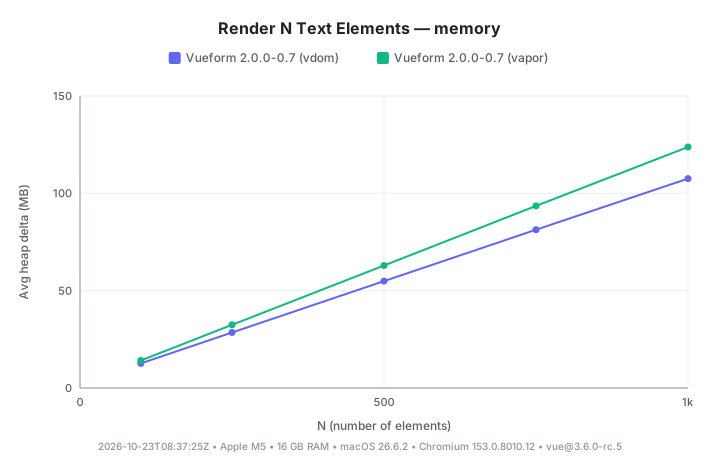
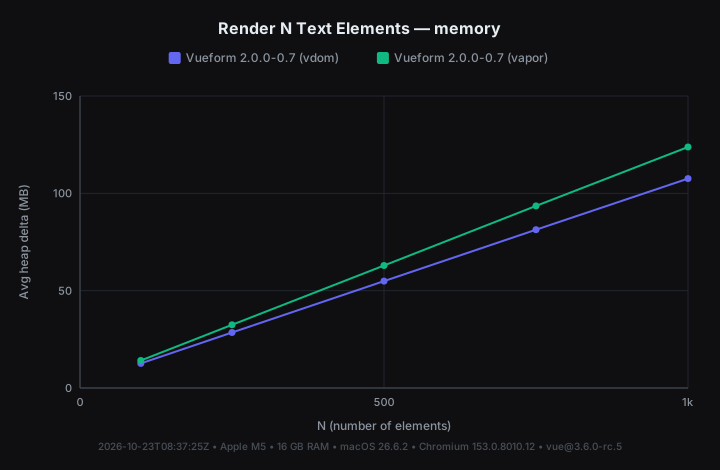
A thousand elements mount in 494 ms — about 0.49 ms per element, each one carrying its full machinery of model binding, validation, conditions, and classes. The curve stays near-linear across the sweep; there is no cliff where the form suddenly falls over. Memory scales the same way — the thousand-element mount grows the heap by 108 MB, about 110 KB per element.
The two modes land within a few percent of each other at mount — ×1.04 of vdom at N = 100 and ×1.03 at N = 1,000, for example. That's expected, since mounting is dominated by work both modes share — creating each element's reactive state and the real DOM nodes — and there is no diffing at mount for vapor to skip. Vapor's mount heap runs slightly higher, at 124 MB against vdom's 108 MB for the thousand-element form.
A thousand inputs on one screen is also the worst case — and rarely what a user should see. Structure the same form in steps and the picture improves considerably.
Rendering in Steps
The render-steps case mounts the same N text elements split evenly across 10 steps of a Stepped Form:
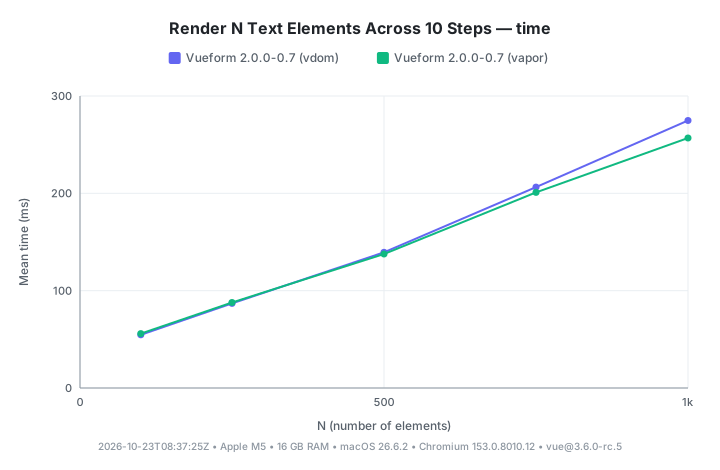
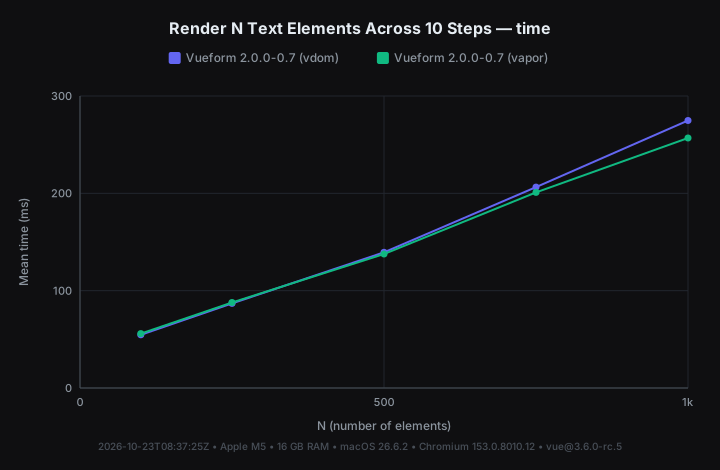
Mount time with N text elements split across 10 steps
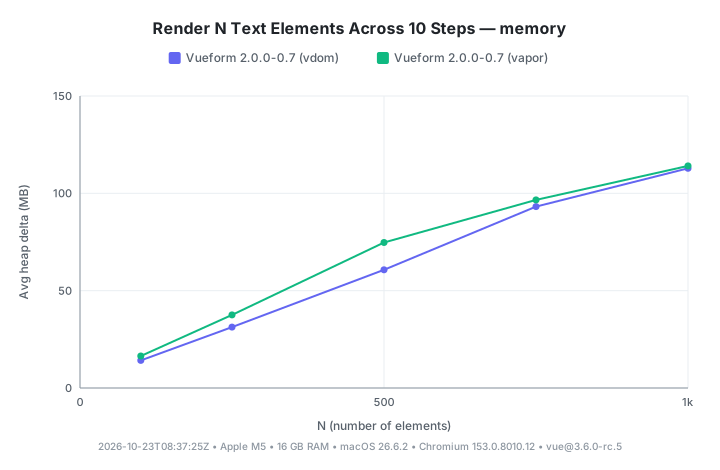
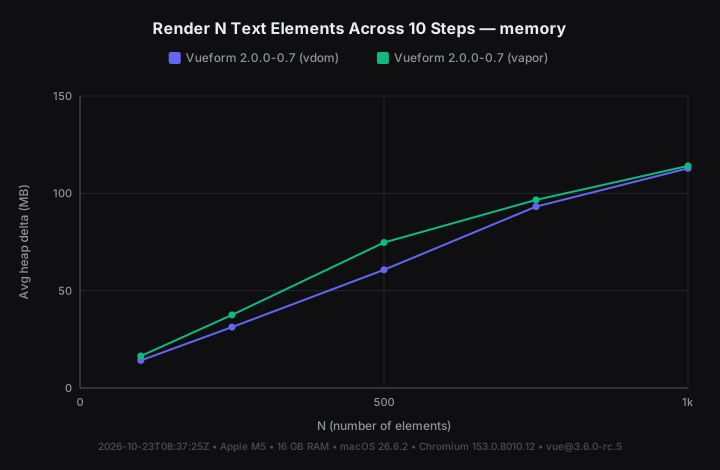
The same thousand elements now reach interactive in 275 ms — 56% of the flat mount — with heap growth down from 108 MB to 113 MB (105%).
Every element still runs its setup at mount, so values, Validation, and Conditions work across all steps immediately — what's deferred is the element's template. Elements visible at mount render right away, while the rest — inactive steps or tabs, condition-hidden elements — render on a requestIdleCallback after mount (a 300 ms timeout where the browser has no idle callback), or immediately the moment they become visible. Switching steps afterwards finds the DOM already there. This deferral is the global lazy option, on by default.
Typing
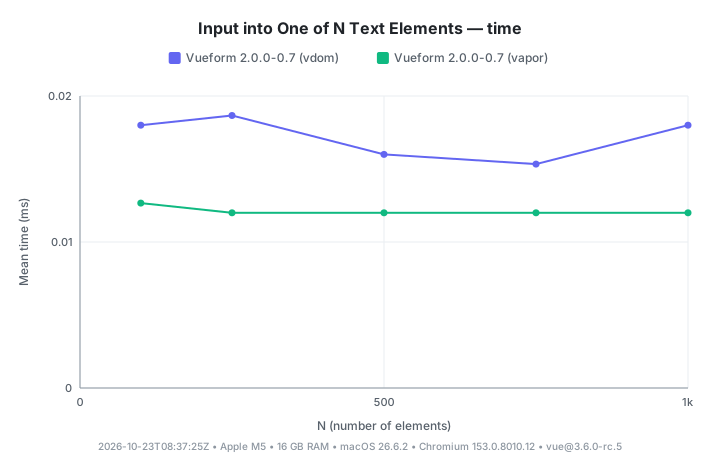
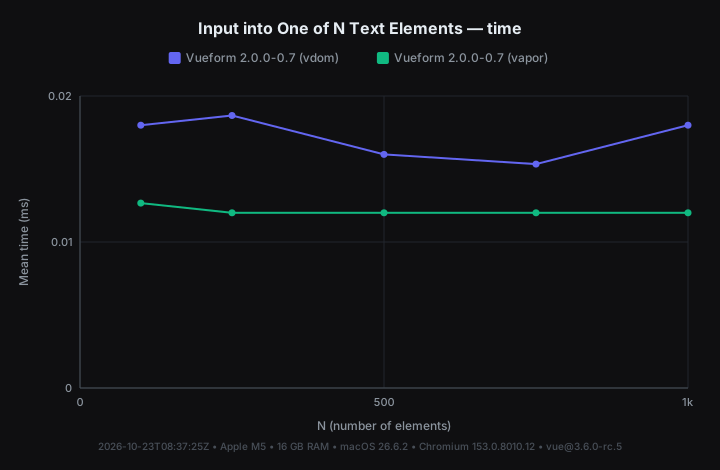
The input-text case mounts a form of N text elements, then dispatches native input events into one of them and measures the cost of a single event:
Average cost of one input event into one of N text elements
One event costs about a tenth of a millisecond whether the form holds 100 elements or 1,000 — 0.02 ms at N = 100, 0.02 ms at N = 1,000, with a band between them that is timer-level noise. The signal is that the line is flat. A write dispatches only to subscribers of the changed path and its ancestors, and the form skips snapshotting the model entirely when nothing consumes it, so the other 999 elements never hear about the keystroke. Form size adds no input latency.
Typing with a Live Binding
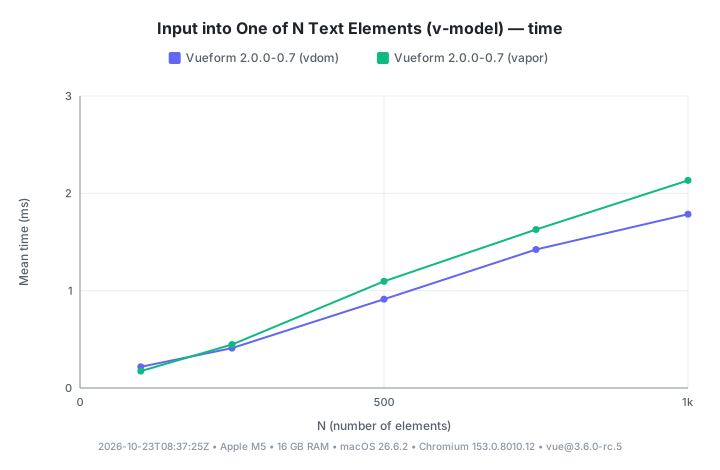
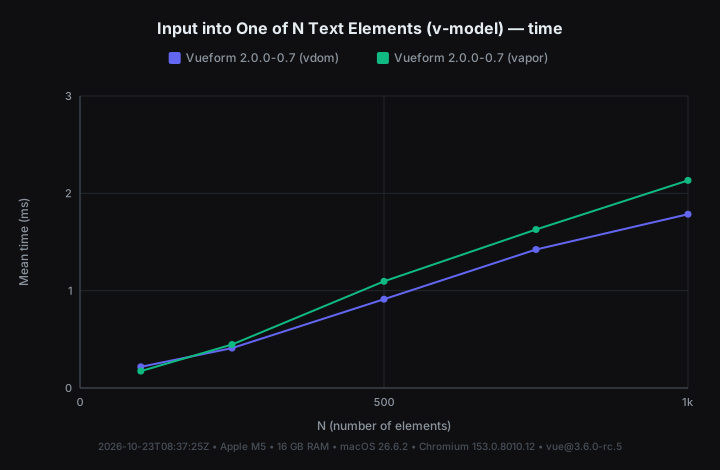
The input-text-vmodel case repeats the same measurement with an active v-model on the form:
Average cost of one input event with an active v-model binding
Now something consumes every change. On each change flush the form deep-clones the whole Model and emits the snapshot as update:modelValue; the incoming value is deep-watched for outside writes, and the form's own echo is skipped by identity. A form-level change listener triggers the same full-model snapshot — it's gated exactly like v-model — while a change listener on an element only clones that element's slice.
An attached useModel instance never pays this. Whether passed to useForm or bound with v-model on VfForm, the form uses the instance's store directly, with nothing to clone and emit — a ref, a reactive object, or a plain object bound with v-model pays the per-change snapshot instead.
The cost grows with form size, but stays small — 1.79 ms per keystroke at 1,000 elements (2.13 ms in vapor), far from perceptible lag.
Replacing All Values
The update-all case measures form$.update() with fresh values for all N elements — the operation behind loading a draft or populating an edit view:
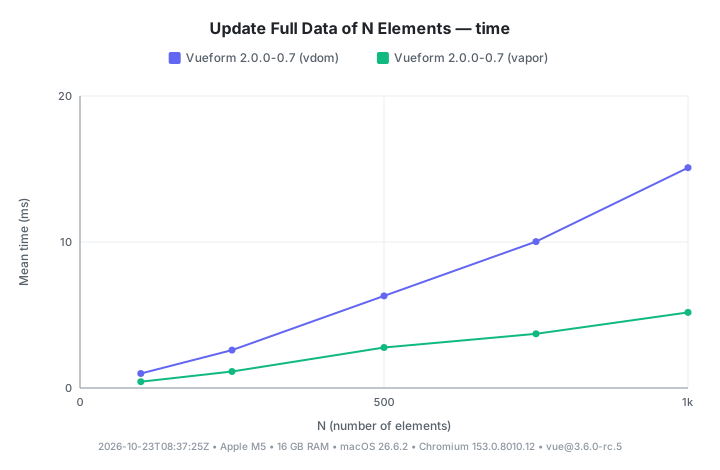
Time to update all N elements' values at once
The cost is linear in N, as it must be — every element genuinely changes. A full update of 1,000 elements takes 15.1 ms in vdom mode and 5.17 ms in vapor. This is where vapor pays off. With every element changing, the vdom re-renders and diffs all of them while vapor patches the changed DOM nodes directly, landing at ×0.34 of the vdom cost — 2.9× faster.
Running the Suite
pnpm bench at the repo root reproduces every case and chart on this page. The suite's README documents the measurement methodology, the CLI flags (--case, --mode, --n, --reps), and how to add a case of your own.
Keeping Large Forms Fast
Split Large Forms into Pages
The biggest lever, quantified by Rendering in Steps — only the visible page renders at mount, and the rest streams in during idle time. A form big enough to worry about is big enough that users prefer it in pages; see Multi-Page Forms for setup. The gain depends on lazy staying on — turning it off is only for setups that need every element's DOM synchronously at mount, and it moves idle-time work onto the critical path.
Share Data Through useModel
When something outside the form needs the data live, hand the form a useModel instance instead of a ref, a reactive object, or a plain v-model binding. Attachment shares one store between your code and the form, so typing stays at the flat Typing cost instead of the growing one — see External Model for the setup. The same goes for change tracking on large forms. Prefer element-level change listeners or reading form$.data reactively over a form-level change listener, which snapshots the whole model on every change.
Prefer Structured Conditions for Logic
An Expression is re-parsed every time it evaluates, while a structured Condition like ['status', '==', 'active'] compares a declared path directly, with no parsing step. Use structured conditions for show/hide logic and a Function Prop for computed text in code, and keep expressions for what they're uniquely good at — definitions that must survive serialization.
Vapor Mode
Vapor mode is worth it for update-heavy forms — Replacing All Values quantifies the gain, while mount cost is unchanged. The opt-in — two switches in the app's build — is covered in Vapor chapter.
What a form costs to load — bundle size rather than runtime — is a separate topic, covered in Code-Splitting.